 Bluefoot Diary中文
How to find piano chords: notes, inversions and reverse lookup
Look up a name when you want its notes. Use reverse lookup when you already have pitches and want possible names. Check the notes and bass before the label: a pitch set can have more than one interpretation in music.
Start with the notes of C major
Open the piano chord finder. In chord lookup, choose root C, major and root position. The result is C, E and G; the highlighted keys connect each note name to its keyboard position.
Click individual keys before playing the whole chord. This separates identifying each pitch from hearing the group together. The tool uses a synthesised sound for reference; an acoustic piano’s tone and sustain will differ.
What do Cm, C7 and Cmaj7 mean?
Read the chord-type suffix after the root, then select that type in the tool. With C as the root:
| Symbol | Type | Notes |
|---|---|---|
| C | Major | C · E · G |
| Cm | Minor | C · E♭ · G |
| C7 | Dominant seventh | C · E · G · B♭ |
| Cmaj7 | Major seventh | C · E · G · B |
| Cm7 | Minor seventh | C · E♭ · G · B♭ |
C7 uses B♭; Cmaj7 uses B natural. Cm7 also lowers E to E♭. A slash gives separate bass information: C/E is a C major chord with E as its lowest note, not an E chord.
Change C to C/E and compare the result
- Keep C major selected and choose first inversion.
- Read the low-to-high order: E, G, C.
- Compare the name C/E with E as the lowest highlighted key.
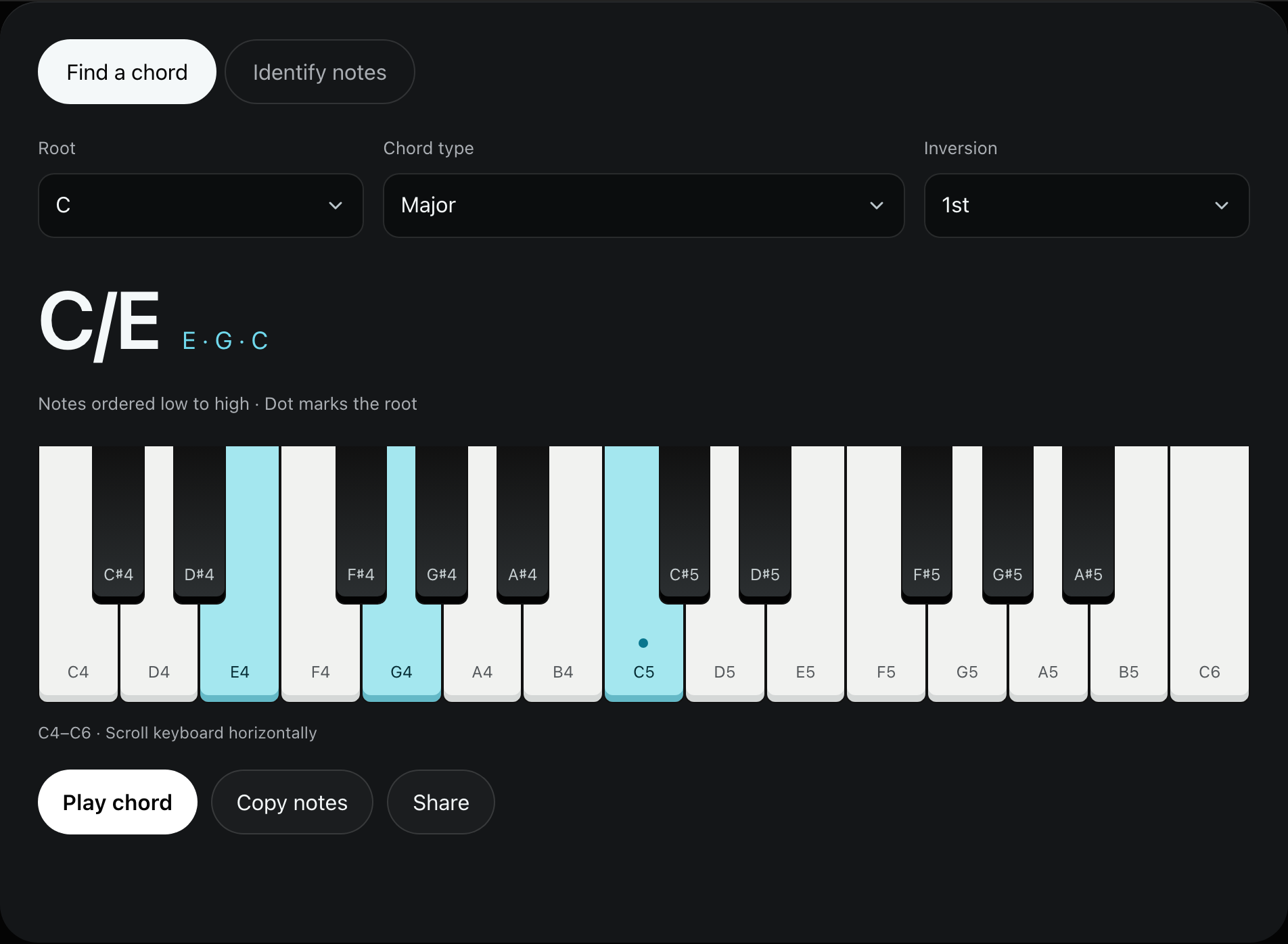
The letter after the slash names the bass. C/E is a C chord with E in the bass; it does not change the root to E or declare the piece to be in E major. Second inversion puts G in the bass. The pitch classes remain C, E and G.
Write root position and first inversion on blank staff paper to compare the voice movement. If written note names are unfamiliar, start with the clef and accidental exercise.
Reverse-lookup C, E, G and A
Switch to reverse lookup. Select C, E, G and A on the keyboard, with C as the lowest pitch. Matches include C6 and Am7/C:
| Name | Notes viewed from the root | Selected bass |
|---|---|---|
| C6 | C, E, G plus A | C |
| Am7/C | A, C, E, G | C |
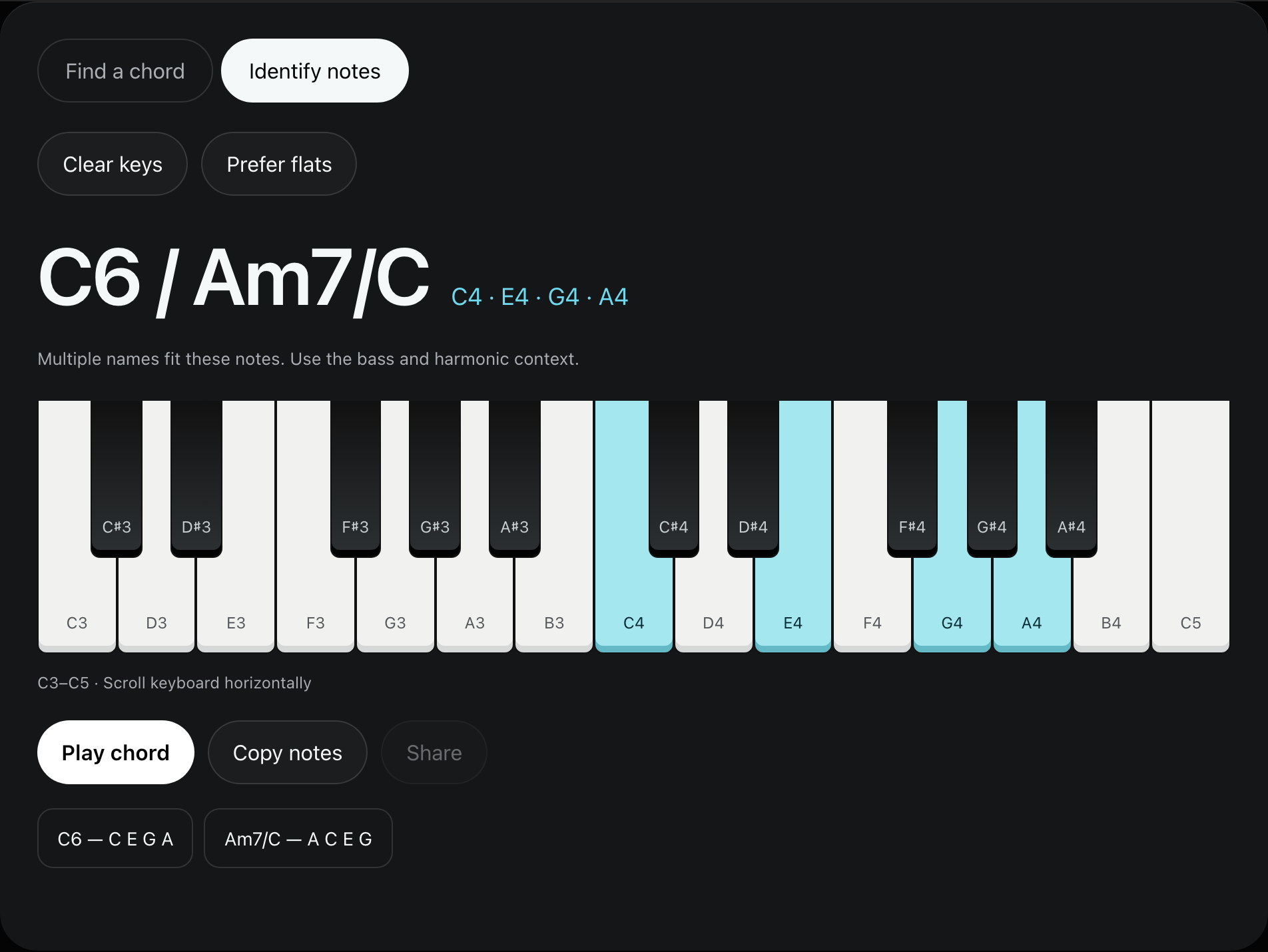
Both names describe this pitch set. The surrounding harmony, melody and bass movement help you choose an analysis. A list of matches cannot settle that musical context by itself.
Reverse lookup needs at least three distinct pitch classes. Adding another C in a different octave does not add a new pitch class. The lowest selected pitch affects the slash-bass label, so check octave placement as well as letter names.
Check the pitches before assuming there is no chord
Clear accidental extra selections and check sharps, flats and the lowest pitch. Reverse lookup matches complete pitch sets. Omitting a third or fifth, or including a passing note, may leave no match.
The tool supports major, minor, diminished, augmented, suspended, and its listed sixth and seventh types. It does not cover every extended chord. An empty result does not mean the original music has no harmony.
In chord lookup you can copy the name and notes or share the root, type and inversion. Reverse lookup does not share a selected pitch set by URL; copy the result or write down the pitches instead.
Common questions
Can it hear a chord through the microphone?
No. Select pitches on the webpage keyboard for reverse lookup. The tool does not record or analyse live playing.
Why does an inversion still keep C in its name?
Root and bass are different roles. C/E keeps the C-major pitch classes while moving E to the bass; the slash names that bass pitch.