 Bluefoot Diary中文
How to convert BPM to delay time: dotted notes, triplets and reverb
A quarter note lasts 60000 ÷ BPM milliseconds. At 120 BPM, that is 500 ms. Halve it for an eighth note at 250 ms; multiply that eighth note by 1.5 for a dotted eighth at 375 ms.
Check which note value the BPM describes
Open the delay and reverb calculator and enter quarter-note BPM. It accepts 20–500, including decimals. If you do not know the tempo, first tap along to the music.
If the marking is dotted quarter = 60, convert it to quarter = 90: a dotted quarter contains 1.5 quarter notes. The time signature alone does not tell you which number to enter.
Distinguish this from the metronome’s 6/8 counting. That metronome counts eighth-note clicks, so dotted quarter = 60 requires 180 there. The delay formula uses quarter notes, so enter 90 here.
Compare straight, dotted and triplet values at 120 BPM
| Note value | Calculation | At 120 BPM |
|---|---|---|
| Quarter | 60000 ÷ 120 | 500 ms |
| Eighth | 500 ÷ 2 | 250 ms |
| Dotted eighth | 250 × 1.5 | 375 ms |
| Eighth-note triplet | 250 × 2/3 | About 166.67 ms |
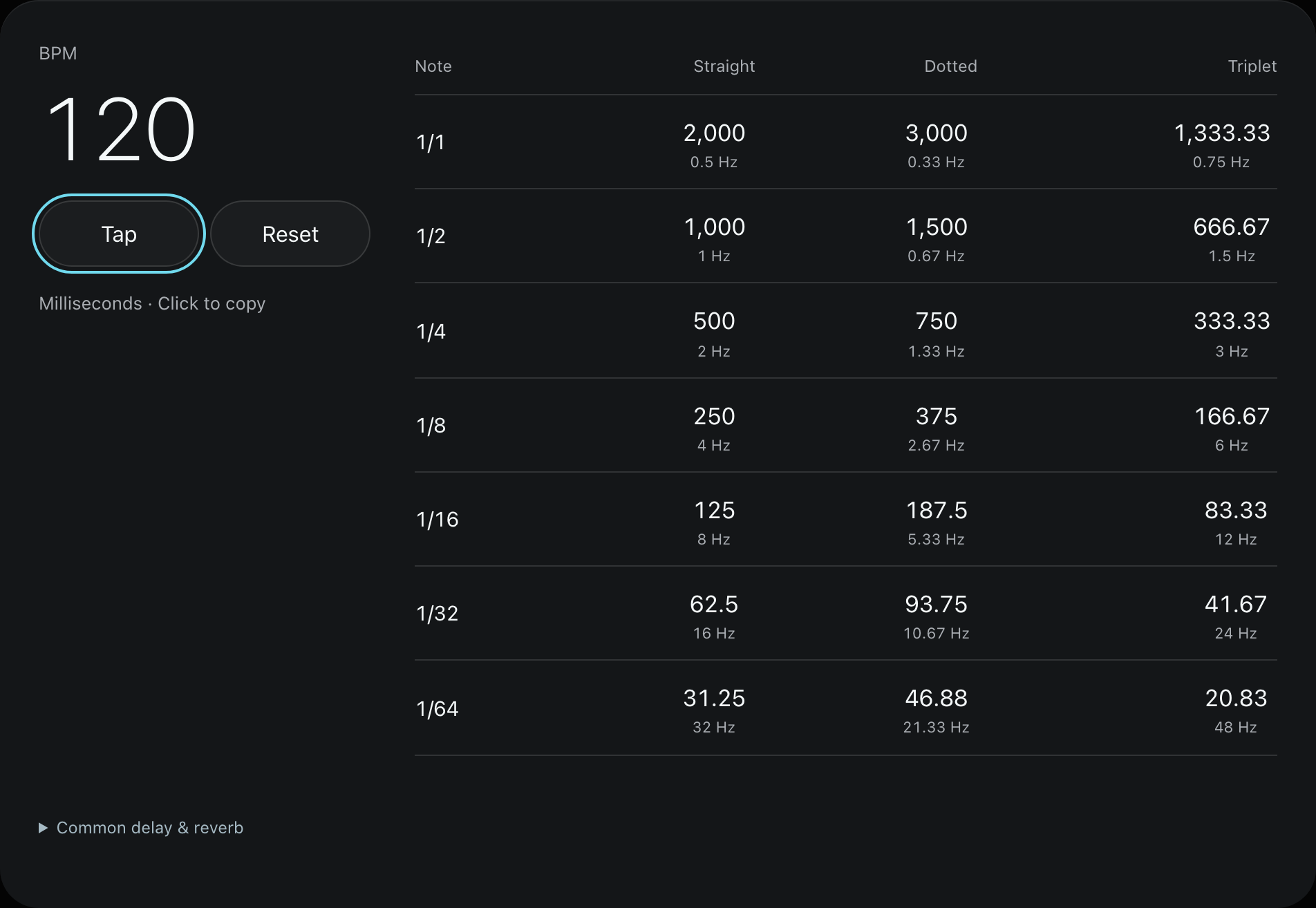
Straight values align with their usual note divisions. A dotted-eighth delay repeats every three quarters of a quarter-note beat. The triplet column takes two thirds of the corresponding straight note duration; it does not divide BPM by three.
Click a value in the calculator to copy its milliseconds into an effect’s time parameter. If the plugin already syncs to the host tempo, select the matching note value there; use the number when setting time manually in milliseconds.
Keep Hz and milliseconds separate
Hz means repetitions per second. A 500 ms interval is 0.5 seconds, so its rate is 1 ÷ 0.5 = 2 Hz, not 500 Hz. The conversion is Hz = 1000 ÷ milliseconds.
Check whether the effect expects ms, Hz or a note value. Modulation rate and echo time can use related units while controlling different things. The calculator’s copy buttons copy milliseconds, not Hz.
What if the plugin expects seconds (s)?
Seconds = milliseconds ÷ 1000. At 120 BPM, a dotted-eighth delay of 375 ms becomes 0.375 s. A decay of 968.75 ms becomes 0.96875 s. Do not paste the millisecond number into a seconds field.
If note sync is enabled, select the corresponding note value instead. Before entering a time manually, check the plugin’s sync state and units. This calculator provides timing references; it does not process audio or configure your plugin.
Split reverb length into pre-delay and decay
Pre-delay is the wait between the dry sound and the start of reverb. Decay describes the tail afterwards. This tool treats the selected total length as the sum of both.
At 120 BPM, its 1/64-note pre-delay is 31.25 ms. The medium total length is two quarter-note beats, or 1000 ms, leaving 1000 − 31.25 = 968.75 ms for decay.

Use this as a listening starting point. If attacks lose clarity, compare pre-delay settings. If the tail masks the next phrase, compare decay and wet level. Plugins define and shape decay differently, so mathematical alignment does not guarantee silence at a particular beat. This calculator supplies parameters; it does not process or play your audio.
Common questions
Why do my times seem half or double what I expected?
Check whether you tapped quarter notes, eighth notes or a larger pulse, then check the effect’s selected note value. Mixing half-time, double-time and note units can create whole-number differences.
Is a dotted-eighth delay always better than a straight eighth?
No. At 120 BPM, 375 ms and 250 ms put echoes in different positions. Compare them in the actual phrase and listen for echoes crowding new notes.